

See how businesses scale with automation

Explore real stories of workflows redesigned — faster intake, cleaner data, and measurable results across industries.
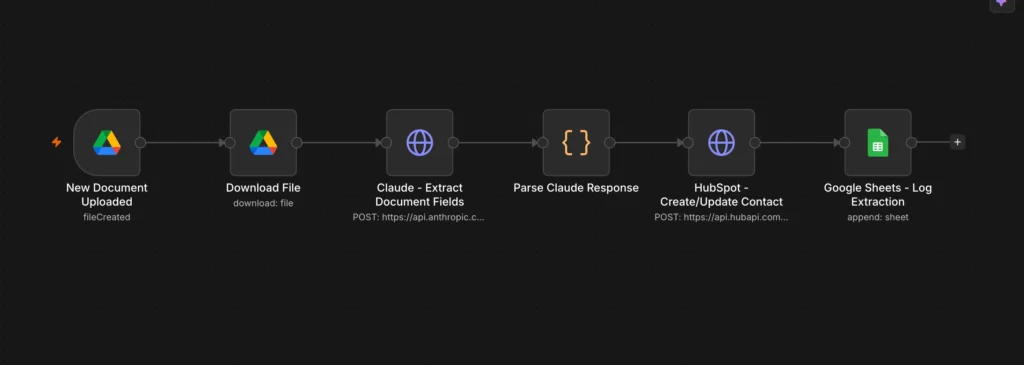
N8N Document Intake & CRM Auto-Fill

Turning uploaded PDFs into fully populated HubSpot contacts with zero manual data entry.

Challenge

The client, a consulting firm, was manually reading every uploaded intake document and copying contact details by hand into HubSpot — a slow process prone to error and delay that pulled staff away from higher-value work.

Resolution

  • Built an N8N workflow that continuously watches a designated Google Drive intake folder for new PDF uploads
  • Automatically downloads each new PDF as soon as it lands in the folder
  • Uses Claude to extract key fields (name, email, phone, and other relevant details) directly from the document
  • Creates a new HubSpot contact or updates an existing record instantly based on the extracted data
  • Logs every extraction to Google Sheets to maintain a full audit trail

Impact

  • Removed manual data entry entirely from the intake process, freeing staff time previously spent on copy-paste work
  • HubSpot records are now updated the moment a document arrives, keeping the CRM continuously current
  • Established a built-in audit log, giving the team full visibility and traceability without extra admin effort

Stack

Tools used: N8N, Claude, HubSpot, Google Drive, Google Sheets

Get this result

Tell us your main workflow pain point. We will outline the fix on a short call.